

Mídia e Performance
Google Ads: the 30.4-day rule that can inflate your spend by up to 38%
You set a daily budget, schedule the campaign to run Monday through Friday, and assume your monthly spend is under control. Sounds logical. But since June 2025, that math no longer works the way you think — and many ad accounts still operate as if nothing changed.
What changed in Google Ads pacing?
Google Ads has always let advertisers define which days and hours campaigns run — Ad Scheduling. Until mid-2025, the budget pacing system respected that limitation: if a campaign ran 22 days a month, the monthly cap was calculated over those 22 active days.
In June 2025, that logic changed. According to Google’s official documentation, the pacing system now considers the full 30.4-day month to distribute budget, regardless of how many days the campaign is active. In practice: Google still respects the days you activated, but concentrates more spend on the days the campaign runs to reach the monthly limit of 30.4 × daily budget.
The impact in numbers
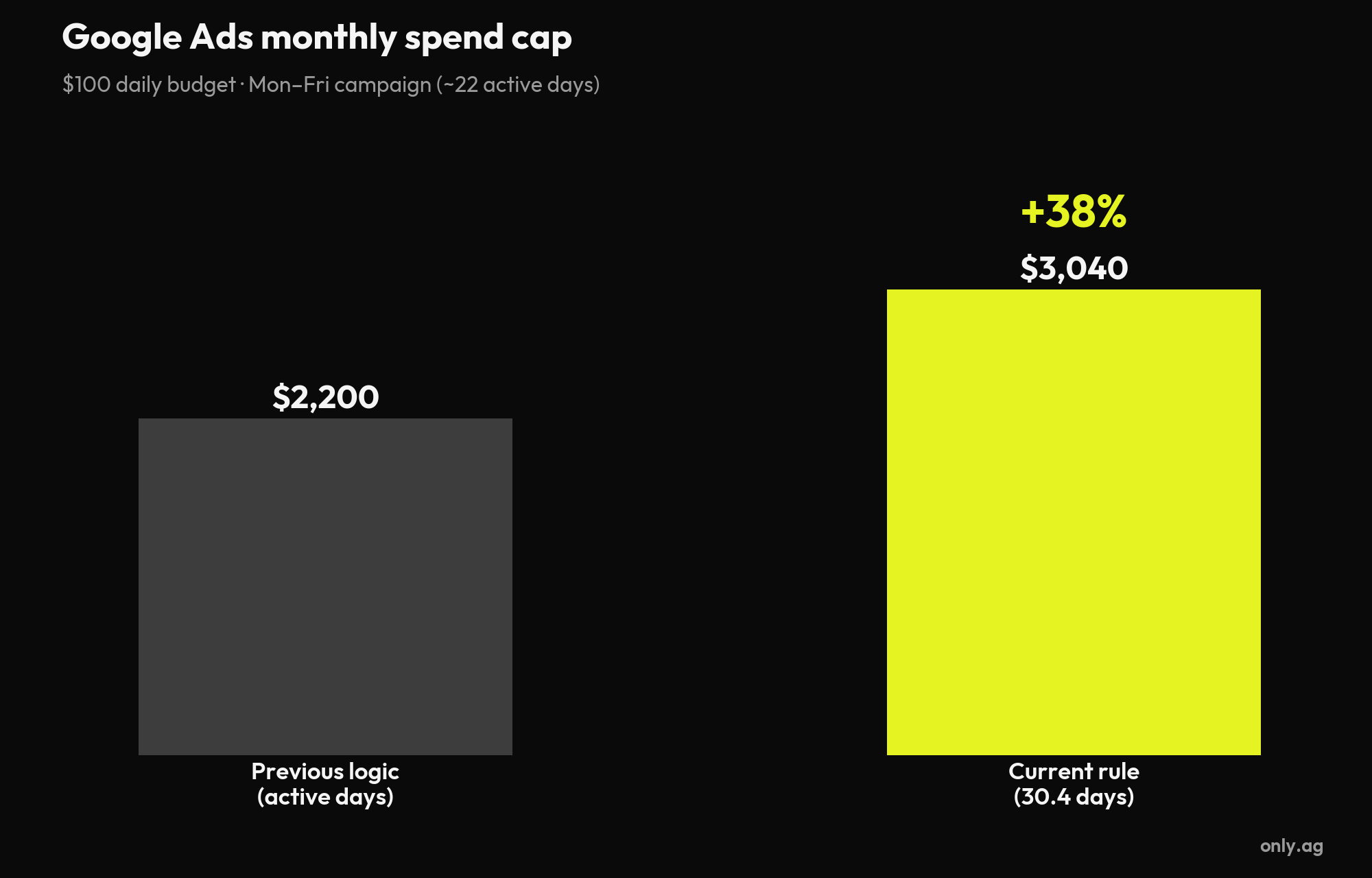
Take a campaign with a $100 daily budget running Monday to Friday (about 22 active days per month):
- Previous logic: cap of $2,200/month, calculated over active days
- Current logic: cap of $3,040/month, calculated over 30.4 days — concentrated on active days
That is a potential +38% increase in monthly spend for anyone who kept the same daily budget and never recalculated after the change.
What Google guarantees (and what it doesn’t)
Three things still hold, per the official documentation: ads don’t serve on days disabled in Ad Scheduling; the daily limit remains — you won’t be charged more than twice your daily budget in a single day; and the absolute cap is still 30.4 × your daily budget per month.
Note the detail: the change affects campaigns scheduled by days of the week. Campaigns that only restrict hours within the day were not impacted by this pacing change.
Which campaigns are affected?
All campaign types that support ad scheduling: Performance Max, Search, Display, Video and Shopping. Local Services Ads, Hotel Commission Ads, Smart Campaigns and App Campaigns are not affected.
One year later: why this still catches accounts off guard
The change triggers no warning in the interface. Anyone who set up campaigns before June 2025 — or inherits accounts from another team — may have been overspending for months without noticing, because the number shown in the dashboard is the daily budget, not the real monthly cap.
It also changed the platform’s profile: Google became less suitable for short, one-off campaigns where precise spend control is essential. Always-on campaigns that run the whole month feel less of the effect — distribution happens naturally across the period.
How to audit your account in 4 steps
- List campaigns scheduled by days of the week and compare actual spend in recent months against the planned budget
- Recalculate each cap: daily budget × 30.4 — that is the real amount Google can spend
- If the cap exceeds your plan, reduce the daily budget proportionally (monthly budget ÷ 30.4, not ÷ active days)
- Reassess whether short-term campaigns should stay on Google or move to platforms with more predictable budgeting
Frequently asked questions about Google Ads budgets
Can Google Ads spend more than my daily budget?
Yes. On high-demand days, Google can spend up to twice your daily budget to capture conversion opportunities. It balances out within the month: total spend never exceeds 30.4 × your daily budget.
How do I calculate my monthly Google Ads budget?
Multiply your daily budget by 30.4 — the average number of days in a month. A campaign at $100/day can spend up to $3,040 in the month, even if it only runs a few days a week.
Does scheduling ads by hours only reduce monthly spend?
No. Restricting hours within the day does not change the monthly cap of 30.4 × the daily budget. To control total spend, adjust the daily budget amount, not the calendar.
What happens if I pause a campaign mid-month?
You only pay for what was spent before the pause. But be careful when reactivating: the pacing system recalculates distribution for the rest of the month, and daily spend can concentrate on the remaining active days.
How Only.Ag protects clients’ media budgets
When this change was announced, Only anticipated the impact and recalculated budgets across managed accounts before the rule took effect — no client was caught off guard. That is the kind of vigilance that separates real media management from campaigns on autopilot: individualized impact analysis, continuous budget review and tactical recommendations for every dollar invested.
Data drives the operation. But business vision defines the strategy. Results and nothing else.
Want to know if your account is spending more than it should? Talk to Only.Ag →
Read next
Schedule a free marketing consultation for your company.
Our experts are ready to help your business take off.

Receba nossos artigos exclusivos
Fique por dentro das nossas novidades e insights.